

Lumin PDF Highlights Shared Document Review as an Alternative to Email Attachments for Agents and Clients
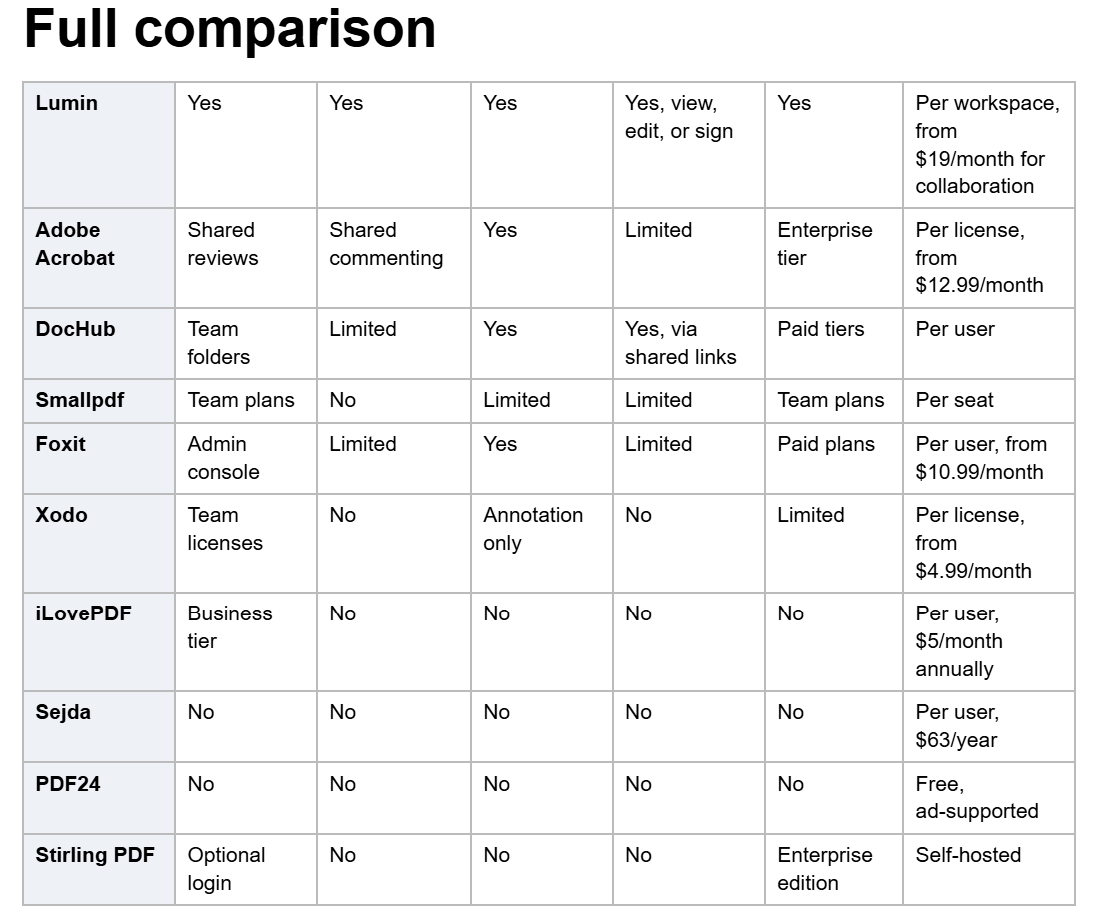
Emailing documents for markup is the default because it requires nothing of the other party. It also guarantees that the authoritative version is whichever attachment was opened last.
The alternative is shared review: one file, one location, several people marking it up. That takes a PDF editor designed for shared access rather than single-user markup, and the options differ sharply depending on who needs to get in, how technical they are, and whether a record of the conversation is needed afterward.
Quick picks
- For agents and clients working on one live file: Lumin. Shared workspaces with tagging, comments, and multiple people editing the same document
at once, priced per workspace rather than per seat.
- For review that ends in a signature: Lumin again, since the same document moves from markup to eSignature with an audit trail, without an export in between.
- For occasional external markup at no cost: DocHub. Free-tier editing with Drive and Gmail connections, capped by a small monthly signature allowance.
Why shared review is a different problem from editing
Single-user editing and shared review look similar and behave nothing alike. Four things separate them.
- Concurrency. Can two people work on the document at the same time, or does the second person get a read-only copy until the first one is finished?
- External access. Clients are not employees. Asking them to create an account, install software, or learn an interface is where review processes die.
- Attribution. Six weeks later, someone needs to know who asked for a clause change. Anonymous markup does not answer that.
- Permission scope. A client should be able to comment without altering the terms. That requires more granularity than "shared with" and "not shared
with."
The cost of getting this wrong is measured in time rather than money. McKinsey Global Institute research found that the average interaction worker spends 28% of the workweek managing email and nearly another 20% looking for internal information or tracking down colleagues who can help with a task. Duplicate marked-up copies scattered through an email thread feed both numbers at once.
Meanwhile, the underlying market continues to expand: Grand View Research valued enterprise content management at USD 39.7 billion in 2025, projecting USD 44.7 billion in 2026 and USD 110.4 billion by 2033, at 13.8% annual growth, with North America holding the largest regional share.
Winners by scenario
Best for agents and clients marking up the same document
1. Lumin
Lumin is a document workflow platform built around shared workspaces, which is why review happens inside it rather than beside it. Teams work in shared workspaces, tag each other, and leave notes on files. Multiple teammates can make edits at the same time, and document sharing allows anyone to be given view or edit access.
The annotation set covers what review actually requires: highlighting text, freehand drawing, adding text boxes anywhere on the page, inserting shapes and images, and commenting with tagging so a specific person is alerted rather than everyone. Page-level tools sit alongside, so a reviewer can rotate a badly scanned page or pull out a section without leaving the document.
Two features matter more than they first appear. Restore original file returns a document to its original version, removing the anxiety that leads people to keep private copies in the first place. And on Business plans, member access control plus domain control scope, who can do what, so a client can be brought in without gaining access to everything else in the workspace.
Pricing is per workspace with a monthly document allowance rather than per seat. Free: $0 with 3 documents per month. Pro starts at $19 per team per month, with 200 documents shared team-wide, advanced editing, and document collaboration. Business starts at $99 per team per month, adding member access control, domain control, enforced sign-in with Google, connectors for Slack, Drive, and OneDrive, priority support, and team insights to monitor feature usage. Workspace membership is uncapped, which is the point: adding a client or a subcontractor to a review does not add a line to the invoice.
Lumin maintains a SOC 2 report with independent auditors, complies with GDPR and CCPA, encrypts at rest with AES-256 and in transit with TLS 1.2 or higher, and provides role-based access control and audit logs. It has a 4.8/5 rating on Trustpilot.
2. Adobe Acrobat
Shared commenting and review across desktop, web, and mobile, with permission management through the Admin Console. Licensing is per seat: $14.99 per license per month for Standard for teams and $23.99 per license per month for Pro for teams, so every internal reviewer is a cost line item.
3. DocHub
Browser-based editing and annotation with sharing, connected to Google Drive, Dropbox, OneDrive, and Gmail. Paid plans are per user and add small-team collaboration and fillable PDFs.
Skip this scenario if the review consists of one person reading and approving, and a simple annotation tool covers it.
Best for bringing in clients who will not create an account
1. Lumin
Document sharing gives anyone view or edit access to a file, and when the review ends in a signature, signers do not need an account to sign. Signing is mobile-first and works across computers, tablets, and phones. This is the practical difference between a review that completes and one that stalls at the stage where a client is asked to register for something.
2. DocHub
Shared links for viewing and signing, with public documents available on paid tiers.
3. Smallpdf
Browser-based sharing across more than 30 tools, with daily download limits on the free tier and per-seat team plans above.
Skip this scenario if all reviewers are within the organization and already have accounts, and SSO matters more than guest access.
Best for keeping a record of who changed what
1. Lumin
Audit logs allow all activity on any document to be reviewed at any time. Commenting and tagging attributes to every note for a person. When the document is sent for signature, the completed file carries an audit trail and a certificate of completion, and contracts can be tracked from send through to signature with opt-in notifications. That turns "who agreed to this" from a memory exercise into a lookup.
2. Adobe Acrobat
Comment attribution in shared reviews, with audit logs and governance controls on enterprise agreements.
3. Foxit
Editing with comparison and an admin console for centralized control, listed on G2 from $10.99 per user per month, with eSignature sold separately.
Skip this scenario if: documents are internal drafts with no downstream dispute risk.
Best for teams working out of Google Workspace
1. Lumin
Files open directly from Google Drive and work syncs back to the original document, so the reviewed file is the file, not a copy. Google Workspace SSO can be enforced so members must sign in with Google, and administrators can require it. Documents from Google Workspace can be edited without a permanent copy being made in Lumin. On Enterprise plans, storage controls may require that documents remain on a single platform, such as Google Drive.
2. DocHub
Direct Google Drive, Gmail, and Google Classroom integration with editing and signature collection.
3. Smallpdf
Opens from Google Drive, Dropbox, and OneDrive, with paid plans required for full editing.
Skip this scenario if the organization runs on Microsoft 365 alone, in which case OneDrive connectivity should be the first thing tested.
Best for a review that ends in a signature
1. Lumin
The review and the signature are part of the same workflow, not two separate products. A document is marked up, agreed, then sent for signature from the same place, with automatic reminders, so follow-up is not manual, and an audit trail and certificate of completion on return.
For higher-assurance agreements, Verified Digital Signing is an option within the eSignature workflow: a standard eSignature records that a document was signed, while Verified Digital Signing records who signed it and verifies their identity at the point of signing against a verified digital credential.
2. DocHub
Editing and signature requests on one platform, with signature volume metered on the free tier.
3. Adobe Acrobat
eSignature is included on paid plans with response tracking.
Skip this scenario if: the document is a report or a specification that nobody signs.
Ten questions to ask any vendor
1. Can two people edit the same document at the same time, or does the second get a read-only copy?
2. Can a client be given comment access without edit access?
3. Does an external reviewer need to create an account or install anything?
4. Are comments attributed to a named person, and can someone be tagged specifically?
5. Is there an audit log showing all activity on a document, and how far back does it go?
6. Can a document be restored to its original version if a review goes wrong?
7. Does the platform edit the live file in Google Drive or OneDrive, or a copy of it?
8. Is collaboration included in the plan under consideration, or is it a higher tier?
9. Does pricing count internal reviewers as seats, and what does adding a client cost?
10. What encryption is used at rest and in transit, and is there an independent attestation, such as SOC 2?
Frequently asked questions
Can two people edit the same PDF at the same time?
On some platforms, yes. Lumin supports multiple teammates making edits simultaneously in a shared workspace, with commenting and tagging to alert specific people. Most file-operation tools, including Sejda, PDF24, and iLovePDF, lack a concurrency layer and are designed for a single user.
How can a client be allowed to comment without changing the terms?
Use permission scoping rather than a shared link with full access. Lumin offers document sharing with view or edit access, and role-based access control that assigns fine-grained permissions, with member access control on Business plans. Sharing a file as an email attachment provides no control once it has been sent.
Do clients need an account to review or sign?
Not on Lumin. Documents can be shared with anyone for viewing or editing, and signers do not need an account to sign; signing works across computers, tablets, and phones. Requiring registration is the most common point at which an external review stalls.
How can the person who asked for a change be tracked?
Through attributed comments and an audit log. Lumin records all activity on any document in its audit logs, and comments are tied to the person who made them via tagging. When the document goes for signature, the completed file carries an audit trail and a certificate of completion.
What happens if a review goes badly wrong?
Look for a restore function. Lumin can restore a document to its original version, which is a meaningful safety net and also removes the reason people keep private copies. Without it, the recovery path is whatever version someone still happens to have in their inbox.
Is shared review available on free plans?
Rarely in full. Lumin's free plan covers basic editing and eSignatures with a three-document monthly allowance; document collaboration is available on Pro from $19 per team per month, and member access control is available on Business. DocHub includes editing and a small monthly allowance for signatures on its free tier. Treat free tiers as a way to test the workflow rather than to run it.
Does collaborative review work on mobile?
On the platforms with proper apps, yes. Lumin has iOS and Android apps alongside browser and desktop, with work syncing across devices rather than creating separate copies, and signing designed for mobile first. Check specifically whether commenting and editing, not just viewing, are available in the mobile app, because on several platforms, mobile is a subset of the desktop feature set.
ABOUT LUMIN PDF
Lumin PDF is a document workflow platform focused on PDF editing, collaboration and electronic signatures. Its shared workspaces provide tools for teams and external participants to review documents, with access controls and activity records supporting collaborative workflows.
Website: https://www.luminpdf.com/
Media Relation
Lumin PDF Corporation
support@luminpdf.com
Legal Disclaimer:
EIN Presswire provides this news content "as is" without warranty of any kind. We do not accept any responsibility or liability for the accuracy, content, images, videos, licenses, completeness, legality, or reliability of the information contained in this article. If you have any complaints or copyright issues related to this article, kindly contact the author above.
